What Is Hiyori?
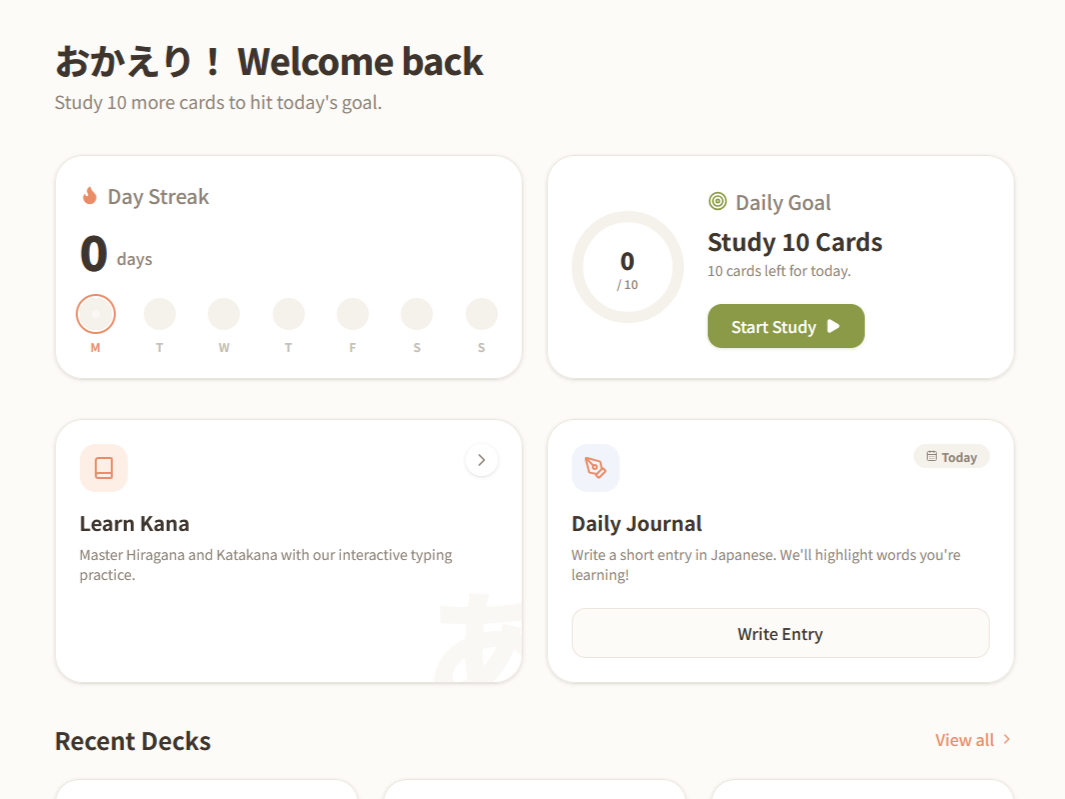
Hiyori is a self-hosted desktop app built around Japanese study:
- Flashcard decks reviewed through spaced-repetition sessions, with a furigana visibility toggle
- A Test mode for checking retention without affecting the study schedule (for self testing purposes)
- Routines that chain Study and Test steps into a repeatable session
- A daily journal for writing practice that highlights words that exist in the current decks
- Kana typing drills for practicing Hiragana and Katakana
- Pending features (marked as Soon): dictionary tab, study insights tab, and an AI tutor
How much of that last group actually gets built is still an open question — more on that at the end.
Why I Built It
I quit my job in 2026 and gave myself a month to properly decompress before learning anything new. React was first on the list, since it's requested in so many frontend roles. So I took a course, worked through a few sample projects, read through the docs, and then hit the point where all that was left to do was put my hands to work on a project that is actually relevant to me.
After some brainstorming, I realized I already had a candidate problem. Years earlier, back in university, my first personal frontend project was Japanese Core — a small Vue flashcard app — to fix a specific gap in Anki-style tools: I wanted to test myself on a kanji word's meaning and its reading separately, without the two collapsing into one generic "flip the card" interaction (the full backstory is here). Japanese Core solved that for me at the time, and after a long break, I picked Japanese study back up this year with the goal of passing JLPT N4.
So the initial goal for Hiyori was: bring that flashcard reading/meaning separation into a more complex app, with a daily journal that highlights which of my flashcard words show up in things I write, so I can see what I've retained versus what I only recognize on a card.
Studying, Testing, and Building Routines
Decks are reviewed the way you'd expect — flip a card, grade yourself — but I didn't want a simple right/wrong toggle. In my opinion, "I knew it, but it took a few seconds to get there" and "that was as automatic as blinking" should earn different grades, so I went with these 3: Again / Good / Easy. Decks can also be exported and re-imported as plain JSON files, so it doubles as a manual backup and a way to move a deck between installs.
Alongside that, there's a separate Test mode: pick the decks you want to get quizzed on, but instead of the grading affecting your study schedule, this mode only displays a results summary at the end — it never touches a card's actual schedule. I made this mode for when I want to do an overall situation check on specific word groups, like if I want to review the entire N5 Vocab list, I can add the decks for N5 Verbs, N5 Nouns, etc, and in the end see how well I'm currently doing. In the future, I may consider adding a history/log so you the user can check their previous results and do a comparison.
Routines allow you to chain Study and Test steps into a named, repeatable sequence (study this deck, then test yourself on it, for example) and run the whole thing as one session instead of hopping between screens each time. One routine can be marked "active," so it's the one-click default when I sit down to study. Fun fact: This feature was inspired by the SmartHome app from my air conditioner device.
A Journal That Talks to the Decks
The daily journal is meant for Japanese writing practice — it automatically highlights any vocabulary that already exists in my flashcard decks as I write. The goal is to connect the two study modes and help me review previous entries more easily when I try to use new words I'm not yet familiar with.
Where It's Headed
The demo is public, but I don't consider Hiyori ready for a real launch. Before that happens, I want a round of user-testing with a few other learners (friends first), since so far it's only ever had to work for exactly one user: me. I originally scoped this as desktop-only, with the idea that studying is a big-screen activity for me, but now that the core pieces are working together, I'm reconsidering — syncing progress across my own devices might be worth the extra complexity.
On the product side, the plan is an insights tab that shows which journal highlighted words I use the most/least, an AI tutor, and more Settings beyond the dark mode toggle and update check that live there now. A dictionary tab is still on the list too, but I am still unsure about this feature, for the simple fact that each word has so many possible meanings, I think it may be more convenient to just check a real Dictionary. So, I'm not fully sold on the idea yet, but it's a maybe. I am also considering adding a database as well as a backend for hosting locally between devices and more storage space.
The bigger architectural decisions behind all of this — why there's no backend yet, what changes when there is one, and how the app is actually built — are written up separately for anyone curious about the engineering side: Building Hiyori →