Overview
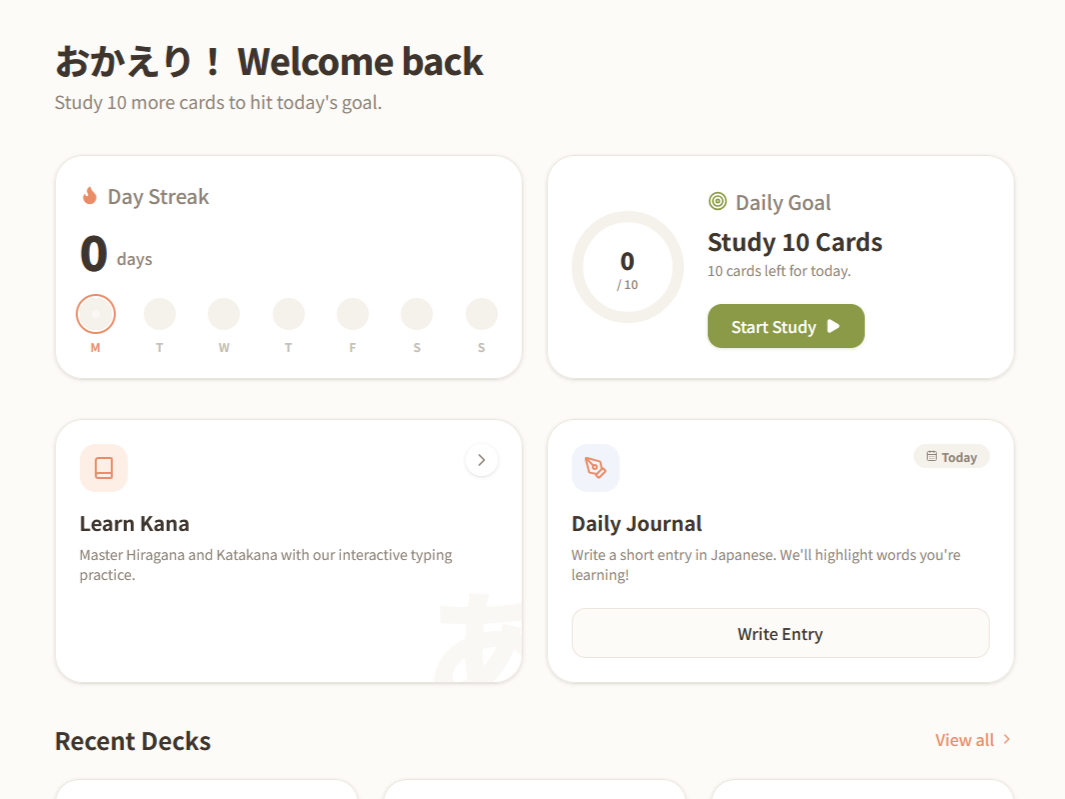
Hiyori is a self-hosted Japanese study app: spaced-repetition flashcards, a journal that highlights vocabulary that exists in the decks, and kana practice drills, built as a Tauri desktop app with React and TypeScript. This page covers the engineering decisions behind it — the architecture, some tradeoffs, and my ideas for what to change next.
Stack
React, TypeScript, and Tauri, with Zustand for state and a custom design token system that fits my specific needs while keeping everything consistent. For the state, I chose Zustand over Redux for the simplicity, for this use case there was no need for extra complexity.
The Spaced Repetition Engine
Flashcard scheduling runs on a simplified version of the SM-2 algorithm, graded Again / Good / Easy rather than just right or wrong. Again resets the interval and lowers the ease factor. Good and Easy both push the interval forward, but not identically: Easy also nudges the ease factor up on top of the extra interval multiplier, so an "easy" card doesn't just get pushed out once — it compounds, drifting toward longer review gaps faster than a "good" card would. Test mode shares the review UI but not the consequences: it grades against a separate results object (testSessionStore) that never touches a card's SRS fields, so it's safe to use as a no-stakes retention check without corrupting the study schedule.
Local-First Storage, and Why There's No Backend (Yet)
Everything Hiyori does today is pure client-side computation on data that's already in memory — SRS scheduling is arithmetic on a card's stored ease/interval, journal highlighting is string matching against decks already loaded into the store, deck import/export is file I/O. None of it needs a network round-trip, so none of it gets one.
Storage is localStorage. Every store (decksStore, journalStore, themeStore, testSessionStore, routinesStore, studyLogStore) persists through Zustand's persist middleware, which writes straight to localStorage — I didn't have the need for IndexedDB, SQLite, or file storage. However, decksStore carries an explicit schema version with a migration function. When I added spaced-repetition state to cards after some decks already existed on disk, the migration backfilled SRS fields onto old data instead of wiping it. Small thing, but it means the storage format can keep evolving without corrupting or resetting anyone's progress without notice.
Decks can be exported and re-imported as JSON — export writes out { title, cards }, and import is deliberately tolerant, accepting either that full shape or a bare array of cards for quick personal imports, with a friendly toast instead of a crash if the file's invalid. For now that's the only backup path, and it only covers decks — journal entries and SRS progress have no export at all yet.
Why staying backend-less made sense so far:
- I wanted to start with a quick prototype that I could test for myself
- Zero hosting cost, nothing to patch or keep online
- Works fully offline, no dependency on infrastructure I run
- No auth system, because there's nothing to log into
- Every interaction is instant — no network latency, ever
- Much faster to iterate solo, no API contract to keep in sync with a client
What it costs me:
- No cross-device sync — decks and journal are trapped on whichever machine's browser storage they're in
- No backup for journal entries or SRS progress, only manually-exported decks
localStoragehas a practical size ceiling (typically 5–10MB per origin) — nowhere near an issue yet with a few hundred cards, but a real constraint if decks grow a lot or the journal accumulates for years
I'd rather name that as a deliberate, temporary tradeoff than let it read as something I didn't think about — see below for what actually changes it.
Tauri vs Electron
After internal debate, I ended up choosing Tauri. The deciding factors were footprint and the default security posture. Electron ships its own bundled Chromium and Node runtime inside every app; Tauri renders through the OS's native webview (WebView2 on Windows, WebKit on macOS), so the shipped binary is a fraction of the size and there's no second copy of a browser running in the background. Tauri also defaults to a locked-down Content Security Policy that blocks external resources outright — which is why the Japanese font (Noto Sans JP) is self-hosted through @fontsource instead of pulled from a Google Fonts <link> tag; a CSP that strict simply won't allow the external request.
Accessibility
One of the most recent QoL improvements was adding keyboard shortcuts to the study loop — Space or Enter to flip a card, 1/2/3 to grade it, K to toggle kana — with small visible keyboard hints right on the buttons themselves. Every card flip and grade is also announced to screen readers through a live region, so studying doesn't silently depend on reading the screen — a screen reader user gets "Card: 食べる" and then "Answer: to eat" spoken automatically as they move through a session, without hunting back through the DOM after every flip. Toggle-style controls (like "Always show kana") use aria-pressed rather than relying on color alone to communicate state.
That same attention to keyboard and screen-reader behavior carries into the modals: every confirm dialog in the app — deleting a deck, deleting a journal entry, discarding an unsaved draft, an update that's ready to install — and the mobile navigation drawer share a single focus-trap hook and modal shell instead of each screen rolling its own. It traps Tab/Shift+Tab so keyboard focus can't leak into the page behind the dialog, auto-focuses the safest action on open, closes on Escape, carries proper role="dialog" semantics, and returns focus to whatever triggered it.
Performance
A couple of the JLPT decks have around 600 cards; the deck editor's word table is virtualized with @tanstack/react-virtual so that only the rows actually in view get mounted — without it, opening one of those decks would mean 600+ rows of inputs and buttons sitting in the DOM at once, whether or not they're on screen.
One of my next performance improvements will be implementing route-based code-splitting. Currently, the demo ships as one JS bundle in the ~700KB range (Vite flags this at build time). The goal is to decrease this to under 500KB.
Shipping It: CI/CD and Auto-Updates
Hiyori runs on two separate GitHub Actions workflows:
- A CI workflow runs on every push and pull request — install, lint, typecheck, build — as a merge gate, so a broken build can't quietly land on the branch the live site deploys from.
- A separate Release workflow only runs when I push a version tag: it spins up a Windows runner, compiles the Rust shell, bundles the installer, signs it, and publishes it as a GitHub Release alongside a small update manifest.
Every release is signed. The GitHub Actions Release workflow signs the installer with a private key that exists only as a CI secret. The app only carries the matching public key, baked into its config at build time, and refuses any update whose signature doesn't verify against it. That trust boundary is built in from the first release rather than added later. Enforcing signature checks on an update mechanism people are already using would require every existing install to first receive a version that even knows how to check, so I wanted to make sure this was working properly before sharing this project.
The update flow when the app is launched is: the app checks the latest release manifest in the background; if there's nothing new, or if the check itself fails, nothing extra appears, so even if there's a connection issue, the user isn't affected. If an update is found, a modal shows the new version and its release notes; if the user confirms, it downloads the signed installer, verifies the signature, installs it, and relaunches the app automatically. The same check is also available for manual checks in the Settings page.
Storage and Syncing - Future Considerations
I knew early on I might want a database and a backend eventually, but while this was still a solo prototype, the priority was testing what core features worked for me in my study practice, not building infrastructure for a user base of one. Now that the app gets some daily use, I feel more ready to start brainstorming the best approach.
One part really is independent of everything else: localStorage has a capacity ceiling, and bigger decks plus years of journal entries will eventually bump into it. A local database (something like SQLite through a Tauri plugin) fixes that on its own, on a single device, with no need for networking — that part doesn't depend on anything below.
The AI tutor wouldn't necessarily need a backend either (if it remains a local only app). It's planned as either a small local model, or a bring-your-own-key where the user can supply their your own LLM API key, and the app talks to the provider directly with it. I don't want anyone depending on infrastructure I run.
The still-open question I am struggling with is whether and how my own data should be reachable across my own devices, if I want to host for my phone and keep data synced while I'm out of the house (thus needing a backend), or if local hosting is enough (no backend needed), or if just the local desktop app with no sharing at all would be enough (current version, no backend). Another option I've considered is a file-based approach like what I use to sync Obsidian: store data as many small files, and let an existing tool — Syncthing in my case — sync that folder. No need for a backend for this option either; the "local database" in that version is just the files themselves, and syncing becomes someone else's already-solved problem rather than something I build.
Which of these it ends up being, whether it stays offline, or everything just requires a live connection, isn't decided yet. I would like to gather some feedback before making this important decision.
Curious about the story behind the project — why I built it, and its origins/inspiration? Read that here →